Filestar*
  • File Types1546
  • CloudNEW
  • Blog
  • Pricing
  • Use Cases
  • Help
  • English
    • English
    • Svenska
    • Deutsch
    • 日本語
    • Español
    • 简体中文
    • Français
    • Português (Brasil)
    • Русский
    • 한국어
Download
Filestar Help

General

  • How to Update Filestar
  • Where are my files?

AI Agents

  • Use Filestar With AI Agents
  • Get Started
  • Claude Code
  • Codex
  • Claude Desktop
  • Cursor
  • VS Code
  • Gemini CLI
  • GitHub Copilot CLI
  • Other Agents
  • MCP Server
  • CLI Reference
  • Plans and Limits
  • Privacy

Installation

  • Windows
  • macOS
  • Linux
  • Other Ways to Install Filestar

Licensing

  • Activate Filestar
  • Register
  • Cloud Credits
  • Subscriptions

Features

  • Convert
  • Merge
  • Split
  • Transform
  • Compress
  • Extract
  • Print
  • Email

Advanced

  • Recipes
  • Generate Skills with AI
  • Bulk Renaming
  • Load Files by URL
  • Load Files by Path
  • Load Files by Drag&Drop
  • Load Files by Copy&Paste
  • Exporters
  • Email
  • HTTP Post

Automation

  • Trigger Folders
  • Virtual Printers
  • Desktop Shortcuts
  • Command Line Scripts
  • Command Line Aliases
  • Hotkeys
  • Filestar CLI

Troubleshooting

  • macOS
  • Turn Off Automatic Updates

Other

  • Privacy and Security

Load Files by Drag&Drop

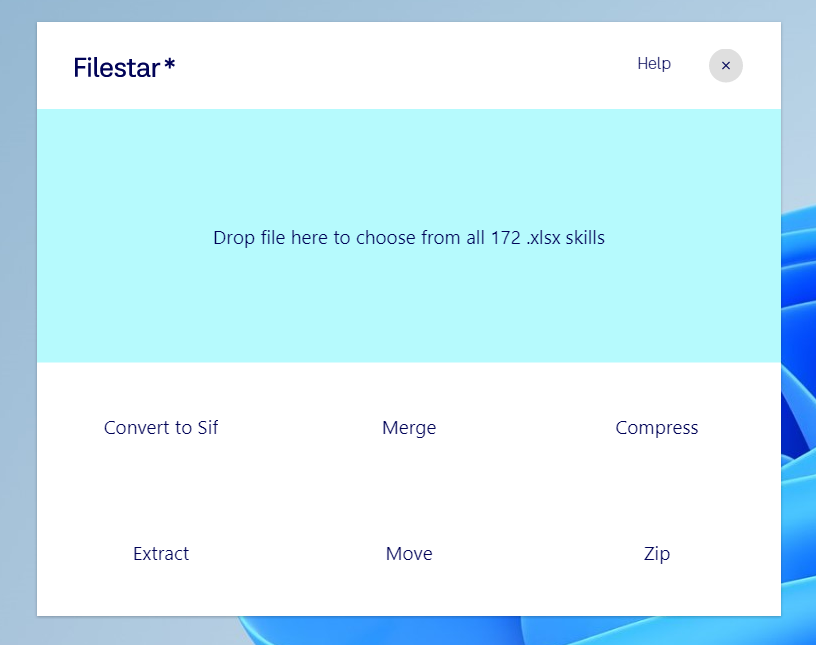
Files can be loaded by just dragging a file over the Filestar window.

Either drop the file in the big bucket to choose among all of the skills or drop it into one of the suggested skill buckets at the bottom.

Load Files by Drag&Drop

PreviousLoad Files by PathNextLoad Files by Copy&Paste
Filestar*
Filestar.com
  • Download
  • About
  • Contact
  • Blog
  • FAQ
  • Help
  • Terms and Conditions
  • Privacy Policy
Support
[email protected]
Facebook
Twitter
LinkedIn
YouTube
Instagram

Made in Sweden by Bosma Interactive AB • Copyright 2018-2026 • SE556792668701