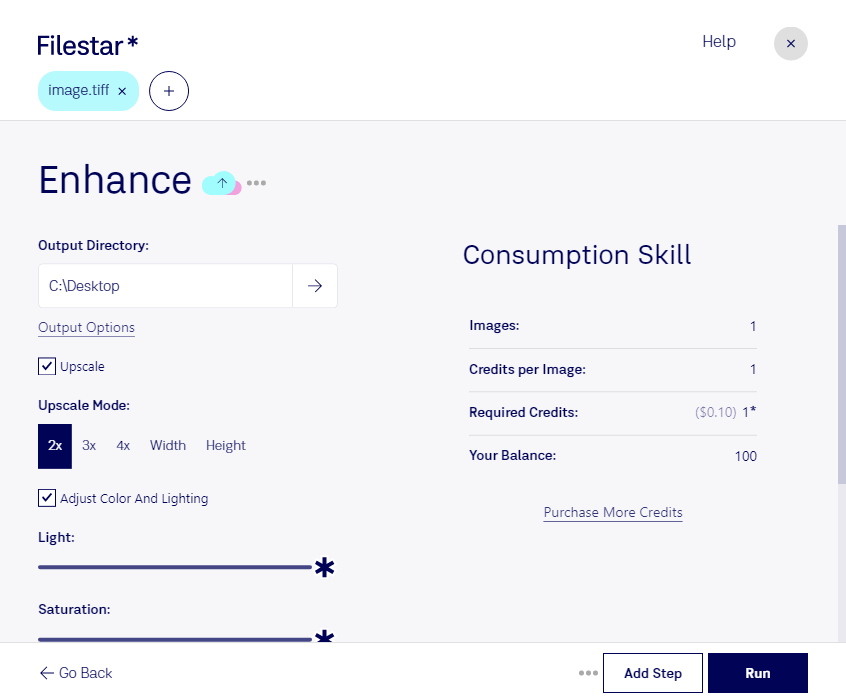
Enhance tiff

  1. Download and install the latest version of Filestar.

  2. Right click on one or more Tiff file(s) on your desktop and select Convert with Filestar.

  3. Type enhance in the search box.

  4. Press Run.

Or let an AI agent do it: filestarcli -i photo.tiff -c "enhance" (how).

enhance tiff

Let your AI agent enhance TIFF

Claude Code, Codex, Cursor and other agents can do this on your computer with Filestar. Your files stay on your machine.

Install Filestar and add it to your agents:

npm install -g filestar
filestarcli agent install

Then ask your agent:

“Use Filestar to enhance TIFF in my Downloads folder”

Or run it yourself:

filestarcli -i photo.tiff -c "enhance"

Runs on your computer, so your files stay on it. Works on Windows, macOS and Linux. 50 free conversions with the npm install, no account needed.

Can my AI agent enhance TIFF?

Yes. Install the Filestar CLI with npm install -g filestar and your agent can run filestarcli -i photo.tiff -c "enhance" on your computer, so your files stay on it.

Using Filestar With AI Agents · Download SKILL.md

What is .tiff?

Extension
.tiff
Format
Binary
Category
Raster Image
Developer
Adobe Systems
Description
A TIFF file is a graphics container that stores raster images. It may contain high-quality graphics that support color depths from 1 to 24-bit and supports both lossy and lossless compression. TIFF files also support multiple layers and pages.
MIME Type
image/tiff

Enhance Tiff Today

Get started within minutes

Enhance TIFF

Filestar's raster image processing software is the perfect solution for professionals looking to enhance their TIFF files. Our software allows for bulk/batch conversion/operations, making it easy to process multiple files at once.

Whether you're a graphic designer, photographer, or architect, our software can help you convert and enhance your TIFF files quickly and efficiently. With Filestar, you can easily adjust the brightness, contrast, and color of your images, as well as crop, resize, and rotate them.

One of the benefits of using Filestar is that our software runs locally on your computer, both on Windows and OSX. This means that you don't have to worry about your files being processed in the cloud, which can be a security concern for many professionals.

In addition to enhancing TIFF files, Filestar can handle a wide range of file types, including PDFs, Word documents, and Excel spreadsheets. This makes it a versatile tool for professionals who need to convert and process files on a regular basis.

If you're looking for a reliable and easy-to-use raster image converter, look no further than Filestar. Try our software today and see how it can help you enhance your TIFF files and take your work to the next level.

Remember, Filestar runs locally on your computer, ensuring the safety of your files and giving you complete control over your data. Contact us today to learn more about our software and how it can benefit your work.