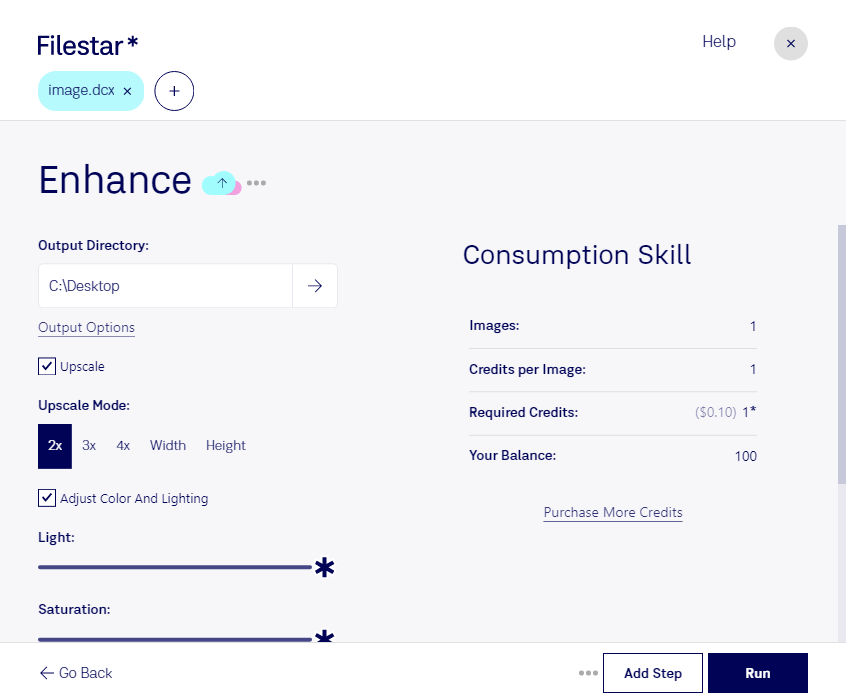
Enhance dcx

  1. Download and install the latest version of Filestar.

  2. Right click on one or more Dcx file(s) on your desktop and select Convert with Filestar.

  3. Type enhance in the search box.

  4. Press Run.

Or let an AI agent do it: filestarcli -i photo.dcx -c "enhance" (how).

enhance dcx

Let your AI agent enhance DCX

Claude Code, Codex, Cursor and other agents can do this on your computer with Filestar. Your files stay on your machine.

Install Filestar and add it to your agents:

npm install -g filestar
filestarcli agent install

Then ask your agent:

“Use Filestar to enhance DCX in my Downloads folder”

Or run it yourself:

filestarcli -i photo.dcx -c "enhance"

Runs on your computer, so your files stay on it. Works on Windows, macOS and Linux. 50 free conversions with the npm install, no account needed.

Can my AI agent enhance DCX?

Yes. Install the Filestar CLI with npm install -g filestar and your agent can run filestarcli -i photo.dcx -c "enhance" on your computer, so your files stay on it.

Using Filestar With AI Agents · Download SKILL.md

What is .dcx?

Extension
.dcx
Format
Binary
Category
Raster Image
Developer
ZSoft
Description
DCX file is a multi-page image file developed by raster file or bitmap file formats. It is generated fro PCX files, so it has a small header that shows the .dcx then a sequence of .pcx data. Popularly used by applications to create and send multi-page fax files.
MIME Type
image/x-dcx

Enhance Dcx Today

Get started within minutes

Are you tired of dealing with slow and inefficient online conversion tools? Look no further than Filestar's Enhance DCX software. This powerful software allows for bulk/batch conversion and processing of DCX files, making it the perfect tool for professionals who need to work with large numbers of files.

Whether you work in graphic design, photography, or any other industry that deals with raster image files, Enhance DCX can help streamline your workflow. With the ability to convert and process files locally on your computer, you can rest assured that your sensitive data is safe and secure.

Filestar's Enhance DCX software is available for both Windows and OSX, making it accessible to a wide range of users. And with its user-friendly interface and intuitive design, it's easy to get started even if you're not a tech expert.

So why waste your time with slow and unreliable online conversion tools? Choose Enhance DCX from Filestar and take control of your raster image processing needs today.